
BRAW vs X-OCN vs REDCODE — Codec Comparison for Davinci Workflows
Blackmagic RAW, Sony X-OCN, and RED REDCODE compared. File size, Davinci Resolve performance, color science, multi-camera matching, and which codec fits which project.
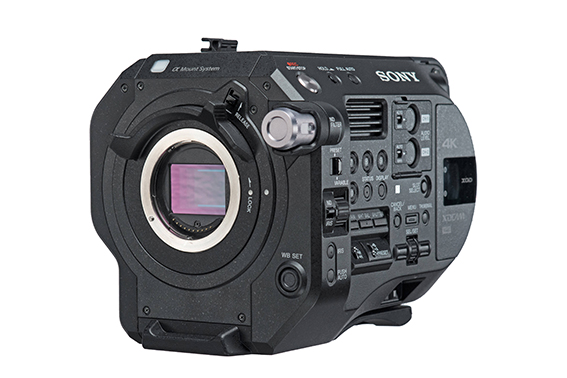
When renting a cinema camera, codec choice isn't just a technical detail — it directly affects post-production time, storage cost, GPU performance, and final delivery quality. Three RAW-based codecs available in Turkey's rental inventory — Blackmagic RAW (BRAW), Sony X-OCN, and RED REDCODE — each follow different design philosophies. This guide gives DPs, post supervisors, and indie editors working in the Davinci Resolve ecosystem a practical comparison.
The Core Logic of the Three Codecs
- BRAW (Blackmagic RAW): Compressed RAW. Sensor data is stored compressed; debayer happens in post. Compression ratios: 3:1, 5:1, 8:1, 12:1. Q0/Q1/Q3/Q5 quality presets for flexibility.
- X-OCN (Sony): "Original Camera Negative" — 16-bit linear RAW. ST (Standard), LT (Light), XT (Extra) variants. X-OCN ST is highest quality, XT is most compressed.
- REDCODE RAW: RED's proprietary RAW format (R3D). Compression ratios from 2:1 to 22:1 (8:1 standard). Sensor RAW data + REDCODE matrix.
All three are "RAW-based" — unprocessed sensor data + post debayer + flexible color grading. But each is optimized with a different approach.
Which Camera Outputs Which Codec?
| Codec | Camera | Daily Rental |
|---|---|---|
| BRAW | Blackmagic Pocket 6K Pro PL | 1,100 TRY |
| X-OCN ST/LT/XT | Sony Venice 2 6K | 16,000 TRY |
| X-OCN ST/LT | Sony Burano 8K | 9,000 TRY |
| X-OCN LT (with Pro Set) | Sony FX9 | 2,750 TRY (Pro Set 7,500 TRY) |
| REDCODE | RED KOMODO 6K | 1,750 TRY |
Note: The FX6 and FX3 don't record X-OCN (they record XAVC variants) — those have a different codec workflow.
File Size — The Practical Side
Hourly file size (approximate):
| Codec / Resolution | Hourly (~GB) | 8-Hour Shoot |
|---|---|---|
| BRAW 5:1 @ 6K (Pocket 6K Pro) | ~110 GB | ~880 GB |
| BRAW 8:1 @ 6K (most compressed) | ~70 GB | ~560 GB |
| X-OCN LT @ 4K (FX9) | ~270 GB | ~2.2 TB |
| X-OCN ST @ 6K (Venice 2) | ~480 GB | ~3.8 TB |
| X-OCN LT @ 8K (Burano) | ~600 GB | ~4.8 TB |
| REDCODE 8:1 @ 6K (Komodo) | ~125 GB | ~1 TB |
| REDCODE 5:1 @ 6K | ~200 GB | ~1.6 TB |
Practical impact: Disk planning for a 1-week shoot:
- Pocket 6K Pro BRAW 5:1 → ~5 TB total (1 day 880 GB × 7) — 1× 8TB SSD or 2× 4TB CFexpress is enough
- Burano 8K X-OCN LT → 30 TB+ — plan 4× 8TB SSDs + cloud backup
- Komodo REDCODE 8:1 → 7 TB — 1× 8TB SSD or 2× 4TB
Davinci Resolve Native Support
| Codec | Resolve Native? | Decode Speed | GPU Requirement (6K real-time) |
|---|---|---|---|
| BRAW | ✅ Native (Blackmagic-developed) | Fastest | RTX 3060+ for 6K real-time |
| X-OCN | ✅ Native (Resolve 18+) | Medium | RTX 3080+ for 6K real-time |
| REDCODE | ✅ Native (RED plugin in Resolve) | Medium-Heavy | RTX 4080+ for 6K real-time; legacy boards used RED Rocket card |
Practical decision: Indie editor (16 GB RAM + RTX 3060) → BRAW. Pro studio (32 GB RAM + RTX 4080) → any codec works.
Color Science — Practical Differences
BRAW
- "Generation 5" color science (2023+ versions)
- In Resolve, Color Science: Film / Extended / Custom options
- Smooth integration in Resolve since Blackmagic owns both — minimal node setup
- Skin tones natural, but extra grading needed for "cinema look"
X-OCN (Sony)
- S-Log3 + S-Gamut3.cine — Sony cinema standard
- 16-bit linear capture — high dynamic range render potential
- In Resolve, start with S-Gamut3.cine to Rec.709 LUT or manual node
- Skin tones "filmic" — modern Hollywood look starting point
REDCODE
- IPP2 (Image Processing Pipeline 2) — RED's modern color pipeline
- Output color space: REDWideGamutRGB, Log3G10
- In Resolve's R3D Tab, ISO, white balance, kelvin can be tweaked in real-time — unique to REDCODE
- Skin tones "RED look" — warm/intense, ideal for drama
Bit-Depth + Dynamic Range
| Codec | Bit-Depth | Dynamic Range (mfg. claim) | Practical DR |
|---|---|---|---|
| BRAW | 12-bit | ~14 stop | ~13 stop |
| X-OCN ST | 16-bit linear | ~15 stop | ~14.5 stop |
| REDCODE | 16-bit (Helium / V-Raptor) | ~17 stop | ~15 stop |
Practical impact: In low-light + high-DR scenes, X-OCN and REDCODE pull ahead. BRAW is sufficient for indie/mid-tier work but the difference shows in 14+ stop scenes.
Mixing Three Codecs in One Project
Scenario: Burano A-cam (X-OCN) + Komodo B-cam (REDCODE) + Pocket 6K Pro C-cam (BRAW). Possible?
Yes, but matching workload increases. Davinci Resolve workflow:
- Recommended: ACES 1.3 workflow (Academy Color Encoding System). All codecs convert to ACES IDT, grading in common color space.
- Alternative: Davinci Wide Gamut (DWG) — Resolve's own wide color space.
- Manual: Separate LUTs or manual nodes per codec — time-consuming.
Practical advice: If multi-codec is mandatory (e.g. Burano + Komodo combo), set up ACES 1.3. If single codec is feasible, prefer bodies from the same sensor family (e.g. Burano + FX9 = same X-OCN family). Detail in: Commercial Camera Packages color management section.
Which Codec for Which Project?
| Project Type | Recommended Codec | Why |
|---|---|---|
| Commercial (fast turnaround) | BRAW or X-OCN LT | Fast debayer, smaller files |
| Cinema quality / festival | X-OCN ST or REDCODE | Highest dynamic range |
| Low-light heavy | X-OCN LT (Burano dual ISO) | 16-bit linear + Sony dual base ISO |
| Action / sports | REDCODE | High frame rate + Komodo global shutter |
| Indie / short film | BRAW | Cheap codec workflow, body 1,100 TRY/day |
| Documentary run-and-gun | X-OCN LT (compact body) | Burano sufficiently compact, X-OCN LT practical files |
Storage + Transfer Practical Tips
Card Type
- BRAW (Pocket 6K Pro): CFast 2.0 or UHS-II SD. CFast preferred.
- X-OCN (Burano/Venice 2): CFexpress Type B (1TB+ at 800-1500 MB/s required)
- REDCODE (Komodo): CFast 2.0 or RED Mini-Mag
Transfer Speed
- USB-C 10Gbps reader: ~1 GB/s theoretical, 600-800 MB/s in practice
- Copying 1 TB X-OCN file: ~30 minutes
- If DIT runs real-time backup on set, transfer is in a race
3-2-1 Backup Strategy
3 copies, 2 different media, 1 offsite. After each shoot day:
- Primary: SSD (USB-C connected, portable)
- Secondary: NAS or 2nd SSD
- Offsite: Cloud (Frame.io, Backblaze, AWS S3 — slow but secure)
Is cloud backup realistic? Uploading 1 TB X-OCN at 5 GB/hour upload bandwidth takes hours. In practice, only master proxies go to cloud, full RAW stays on local + offsite SSD.
Codec Impact on Set Delivery
- BRAW: DIT workload minimum. Few empty cards needed (smallest files).
- X-OCN: DIT workload medium. Burano 8K daily = 4-5 TB cleanup + transfer + checksum verify.
- REDCODE: DIT workload medium-high. RED's CDU (Camera Diagnostics Unit) checksum verify is standard.
At Film Makinesi, when you rent the Burano + Venice 2, we offer DIT support on request. With Pocket 6K Pro PL rental for indie crews, we recommend a DIT training note — workflow isn't complex but discipline matters.
5 Common Mistakes
- Ignoring codec when renting the camera: Trying to edit Burano X-OCN files on a basic MacBook Air — GPU can't keep up, workflow stalls. Editor system must match the codec.
- Picking BRAW 12:1 because "it'll save everything": 12:1 compression shows in extreme grading. For festival quality, prefer 5:1 or Q1.
- Skipping X-OCN ST in favor of LT: ST is full 100% master quality; LT is 40% smaller files but 95% visually identical. Most commercial and indie projects fit LT.
- Believing RED's "17 stop" marketing: Lab conditions. Real world is 14-15 stop. Not dramatically superior to other codecs.
- Skipping multi-codec matching plan: Pre-shoot, DP + colorist must talk. Which codec, which LUT, which color space? That conversation saves hours in post.
Which Codec for Which Budget?
| Budget | Codec + Camera | Estimated Daily |
|---|---|---|
| Indie / short film | BRAW + Pocket 6K Pro PL | 1,100 TRY body |
| Mid-tier commercial | X-OCN LT + FX9 Pro Set | 7,500 TRY |
| Premium commercial | X-OCN LT + Burano 8K | 9,000 TRY (Pro Set 15,000 TRY) |
| Cinema flagship | X-OCN ST + Venice 2 6K | 16,000 TRY (Pro Set 30,000 TRY) |
| Action / sports | REDCODE + Komodo 6K | 1,750 TRY |
Detailed camera comparisons: Venice 2 vs Burano 8K · FX3 vs FX6 vs FX9 · Komodo 6K vs FX6
For workflow consulting: +90 534 892 82 22 (WhatsApp) or the contact form. Free consulting on multi-codec setup planning, ACES workflow setup, and DIT support.
Frequently Asked Questions
Is there a noticeable image difference between BRAW and X-OCN?+
In high-dynamic-range scenes (sunrise, night + spotlight), X-OCN is clearly superior — 16-bit linear vs 12-bit BRAW. In controlled studio environments or mid-DR situations, the difference is subtle for most viewers. Practical decision: if budget covers an X-OCN body, take it; if not, BRAW delivers sufficient quality.
Which codec plays back fastest in Davinci Resolve?+
BRAW is the fastest-debayering codec in Davinci Resolve — optimized because Blackmagic Design owns both. With an RTX 3060 GPU, 6K BRAW real-time playback is practical. X-OCN and REDCODE need a stronger GPU (RTX 3080+ recommended for 6K real-time).
Can three different codecs be managed in a single project?+
Yes, via ACES 1.3 workflow. All codecs convert to ACES IDT, grading happens in a common color space. Pre-shoot DP + colorist must plan matching — which LUT, which color space? That conversation saves hours in post. Practical advice: if multi-codec isn't mandatory, prefer bodies from the same sensor family (Burano + FX9 = X-OCN family).
Does RED REDCODE require a "RED" plugin in Resolve?+
Davinci Resolve 17+ includes native RED debayer — no extra plugin needed. R3D files dragged onto the timeline open automatically. In the R3D Tab, ISO, white balance, and kelvin can be adjusted in real-time — a feature exclusive to REDCODE.
Should I pick X-OCN LT or ST?+
ST is master quality (16-bit linear, highest dynamic range render). LT files are 40% smaller, visual quality 95% identical. Practical decision: festival/cinema flagship → ST. Commercial/indie/standard project → LT. Most projects don't notice the ST → LT step but disk savings are significant.
Can BRAW files be compressed for long-term archive?+
BRAW is already compressed RAW. Additional compression (ZIP, 7z) yields 1-3% savings — not meaningful. For archive: LTO tape or cold cloud storage (Backblaze B2, AWS Glacier) preferred. Master timeline + proxies on local disk + cloud, RAW recordings on offsite SSD/LTO.